
PAXI Portal: Complete Guide to Registering, Sending & Tracking Parcels Online (2026)
Sending a parcel in South Africa used to mean standing in a queue at your nearest PEP, Tekkie Town, or Shoe City store while a staff member typed out every single detail by hand. That’s exactly the problem the PAXI Portal was built to solve.
It’s a free online tool that lets you capture your parcel and receiver information beforehand, so all you need to do in-store is a quick scan and drop.

If you’ve never used it before, the whole idea can feel a bit confusing. Is it an app? A website? Do you still need to visit a store? This guide walks you through everything, from creating your account to troubleshooting common hiccups, so you can start using it with confidence.
Whether you’re sending a birthday gift to a relative in another province, or running a small business shipping to customers daily, this guide covers exactly what you need to know about registering, sending, and tracking parcels in South Africa in 2026.
How to Register on the PAXI Portal (Step-by-Step)
Here’s exactly how to get your parcel from your desk to a PAXI point using the PAXI Portal.
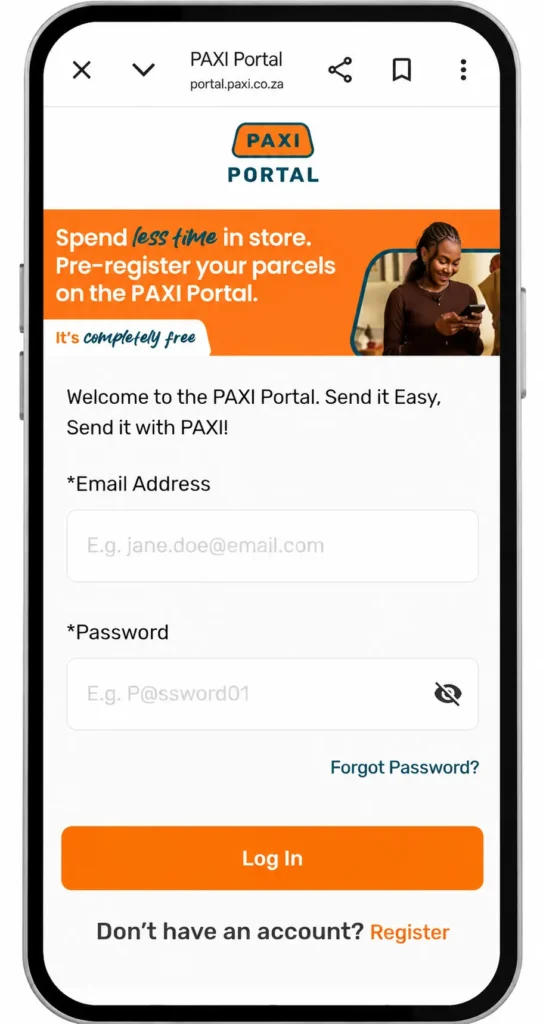
Warning: Always double-check the receiver’s contact number before submitting your details. An incorrect number means the OTP needed for collection won’t reach the right person.
What Is the PAXI Portal?
The PAXI Portal is an online pre-registration platform that lets senders capture parcel details digitally before visiting a PAXI point.
before heading to a physical drop-off point. Instead of filling out a paper form or reciting your details to a cashier, you type everything into the portal once, then simply scan and go in-store.
Why this matters: Pre-registering through the PAXI Portal can make the in-store part of your delivery up to four times faster, since the counter staff no longer need to manually capture your information.
Who Owns PAXI?
PAXI is a parcel delivery network operated with PEP, Tekkie Town, and Shoe City. Together, these brands provide access to over 2,800 collection and drop-off points across South Africa, making PAXI a convenient and widely used delivery service.
Portal vs Store Registration
Walking into a store and registering a parcel on the spot is still entirely possible. Pre-registering online simply moves that same data-capturing step ahead of time, so your in-store visit is reduced to a quick barcode scan rather than a full registration process.
Why Use the PAXI Portal Instead of Walk-In Registration?
There are real, practical reasons South Africans are switching to online pre-registration rather than registering at the counter every time.
Benefits for individuals:
Benefits for small businesses and entrepreneurs:
Tip: If you’re a small business sending five or more parcels a week, the bulk registration feature alone will save you hours every month.
PAXI Portal vs In-Store Registration: Which Is Faster?
Feature | Online Pre-Registration | In-Store Registration |
|---|---|---|
Time at counter | Quick scan only | Full manual capture |
Best for | Frequent senders, businesses | Occasional, single-parcel senders |
Data accuracy | Typed by sender, fewer errors | Relies on verbal communication |
Tracking dashboard | Yes, built-in | Limited to SMS/WhatsApp only |
Bulk parcels | Supported | Not practical |
So, the PAXI Portal is the better method for anyone sending parcels regularly, because it removes repetitive admin and gives you a single place to manage every delivery.
PAXI Pricing and Bag Sizes
Pricing depends on the bag size and how quickly you need the parcel delivered.
Bag Size | Dimensions | Max Weight | Economy (7–9 Days) | Speed (3–5 Days) |
|---|---|---|---|---|
Standard Bag | 450mm x 370mm | 5kg | R59.95 | R109.95 |
Large Bag | 640mm x 510mm | 10kg | R59.95 | R139.95 |
Store-to-Home delivery, where the parcel is delivered directly to the receiver’s address rather than a PAXI point, is also available at a separate rate. For More Information visit the Paxi Prices page.
Note: Prices are subject to change, so always confirm current rates online or in-store before sending.
Using the PAXI Portal for Business
Small and growing businesses get the most value out of this platform, since it was designed with SME sellers in mind.
Tip: If you run an online store, embedding the PAXI point locator widget at checkout reduces customer confusion and cuts down on “where do I collect my parcel” queries.
Tracking a PAXI Parcel
Once your parcel has been registered and dropped off, you can follow its journey in three ways:
The receiver will get a One-Time Pin (OTP) via SMS or WhatsApp once the parcel is ready for collection.
Troubleshooting the PAXI Portal
Even a well-built platform runs into hiccups occasionally. Here’s how to handle the most common ones.
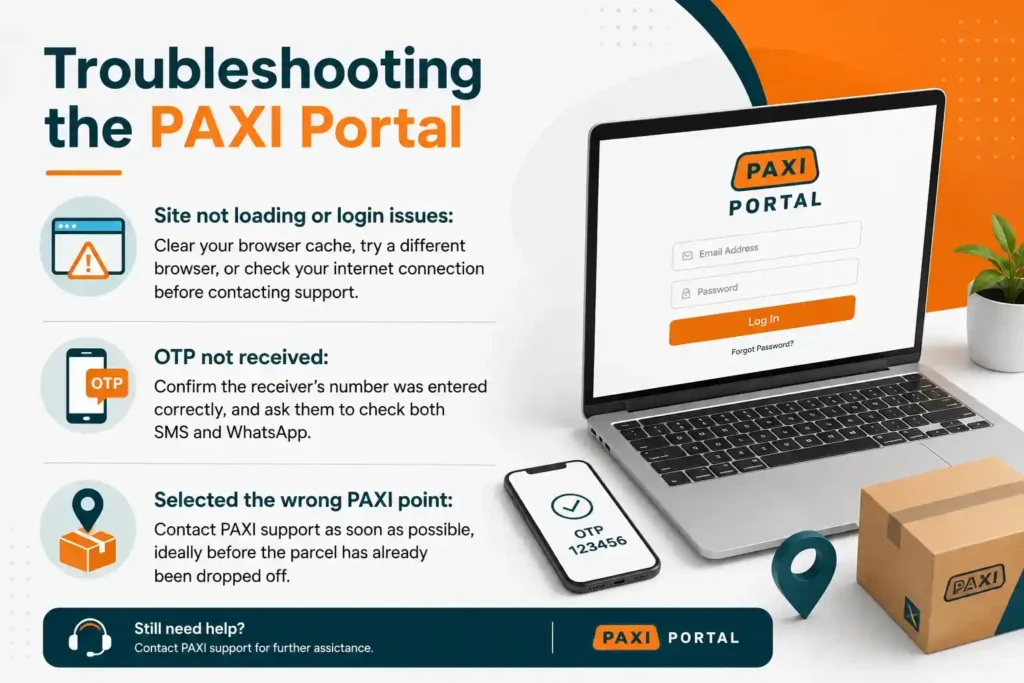
Warning: Never share your OTP with anyone other than the courier or staff member scanning your parcel at the PAXI point.
Where to Find PAXI Points Near You
With more than 2,800 PAXI points located inside PEP, Tekkie Town, and Shoe City stores across South Africa, chances are there’s one within a short distance of your home or workplace. The website includes a point locator so you can search by suburb or postal code before registering your parcel.
Visit the dedicated Paxi Codes page.
Frequently Asked Questions
Final Thoughts
If you send parcels more than once in a while, setting it up is genuinely worth the five minutes it takes. It cuts down your time in-store, reduces the risk of errors in the receiver’s details, and gives you one dashboard to track everything. For small business owners especially, bulk registration and widget integration can turn a repetitive daily task into a quick, routine one.
If you send parcels regularly, registering for the PAXI Portal can save time and make the in-store process much faster.